777CX Game Deposit and Withdrawal Guide – Simple Explanation
If you are new to 777CX and wondering how to add money to your account or take your winnings out, you are in the right place. This guide covers everything from the payment methods available to step by step instructions, fees, promotions, and what to do if something goes wrong. By the end of this page you will know 777CX Deposit and Withdrawal with no confusion.
Quick Overview — Deposits and Withdrawals at a Glance
Before we get into the details, here is a quick summary of everything important in one place.
| Deposit | Withdrawal | |
|---|---|---|
| Minimum Amount | Rs. 100 | Rs. 100 |
| Maximum Amount | Rs. 1,00,000 | Rs. 50,000 |
| Payment Methods | JazzCash, EasyPaisa | JazzCash, EasyPaisa |
| Processing Time | A few seconds | A few minutes |
| Fees | None | Free up to Rs. 10,000 then Rs. 10 per Rs. 10,000 |
| Bonus on Deposit | 0.5% on every deposit | Not applicable |
Deposits on 777CX
How to Find the Deposit Section
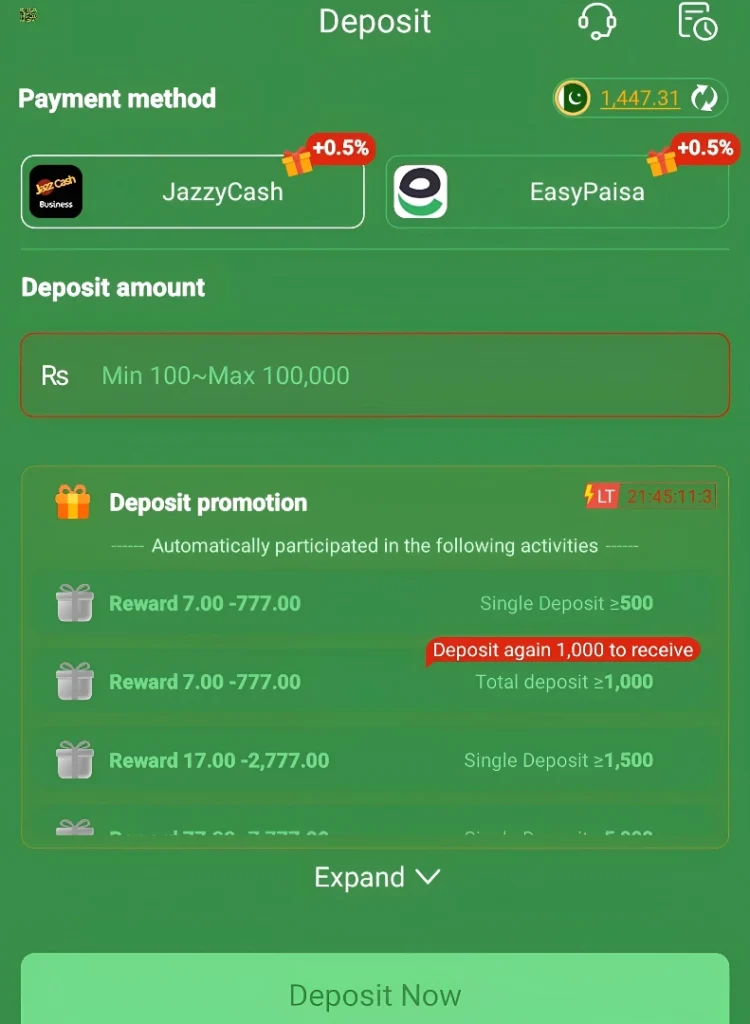
Open 777CX through the app, website, or however you normally access it. Once you are in, look at the bottom center of the screen and you will see the deposit button right there. You do not need to go through any menus or settings to find it.
Payment Methods for Deposit
777CX supports two payment methods for deposits right now:
- JazzCash
- EasyPaisa
Both of these are well known and widely used across Pakistan so most players will already have one or both. A nice little benefit is that both methods give you a 0.5% bonus on every deposit you make. It gets applied automatically so you do not need to do anything to claim it.
Deposit Promotions — Get Rewarded Just for Depositing
777CX has an automatic deposit reward system that gives you extra money based on how much you deposit. The best part is that you do not need to register for these promotions or enter any code.
Here is how the reward tiers work:
| Deposit Amount | Reward Range |
|---|---|
| Single deposit of Rs. 500 or more | Rs. 7 to Rs. 777 (luck based) |
| 2nd deposit of Rs. 1,000 or more | Rs. 7 to Rs. 777 (luck based) |
| Single deposit of Rs. 1,500 | Rs. 17 to Rs. 2,700 |
| Single deposit of Rs. 5,000 or more | Rs. 77 to Rs. 7,777 (luck based) |
The rewards that say luck based mean the exact amount you receive depends on your luck at that moment. You could land anywhere within the range shown. Either way, every qualifying deposit gives you a shot at something extra without any extra effort on your part.
How to Deposit Money in 777CX — Step by Step
A short guide to help you deposit money in the 777 CX Game.
- Go to the Deposit Section
Open 777CX and tap the deposit button at the bottom center of the screen.
- Tap Deposit Now
You will see a Deposit Now button. Tap it to start the process.
- Enter Your Deposit Amount
Type in the amount you want to add. Remember the minimum is Rs. 100 and the maximum is Rs. 1,00,000.
- Select Your Payment Method
Choose either JazzCash or EasyPaisa by tapping on it.
- Enter Your Wallet Number
The app will take you to a payment webpage. On this page, enter the mobile number that is linked to your JazzCash or EasyPaisa account
- Tap the Blue Submit Button
Once the number is entered, tap the blue Submit button to move forward.
- Complete the Payment in Your Wallet App
Open your JazzCash or EasyPaisa app, enter your wallet password or PIN, and confirm the payment from there.
- Done
Your deposit will reflect in your game account within a few seconds. That is how fast it is.
What Happens If a Deposit Fails?
Sometimes a payment can get cut from your JazzCash or EasyPaisa wallet but not show up in your 777CX account. This is not common but it can happen. Here is what to do:
- Wait up to 24 hours. In most cases the amount is automatically refunded to your wallet within that time.
- If 24 hours pass and the money is still not back, contact 777CX support directly. Share your transaction ID from your wallet app and the support team will look into it and help you resolve it quickly.
Always keep your transaction ID saved when making a deposit. It is the easiest way to sort out any issues fast.
Withdrawals on 777CX
How to Find the Withdrawal Section
The withdrawal section is right next to the deposit button at the bottom of the app. Just tap the option on the right side and you are in.
Inside you will find three sections:
- Request Withdrawal — where you request your money
- Receiving Account — where you manage the wallet that receives your money
- Withdrawal Records — your complete withdrawal history
Setting Up Your Receiving Account — Read This Before Anything Else
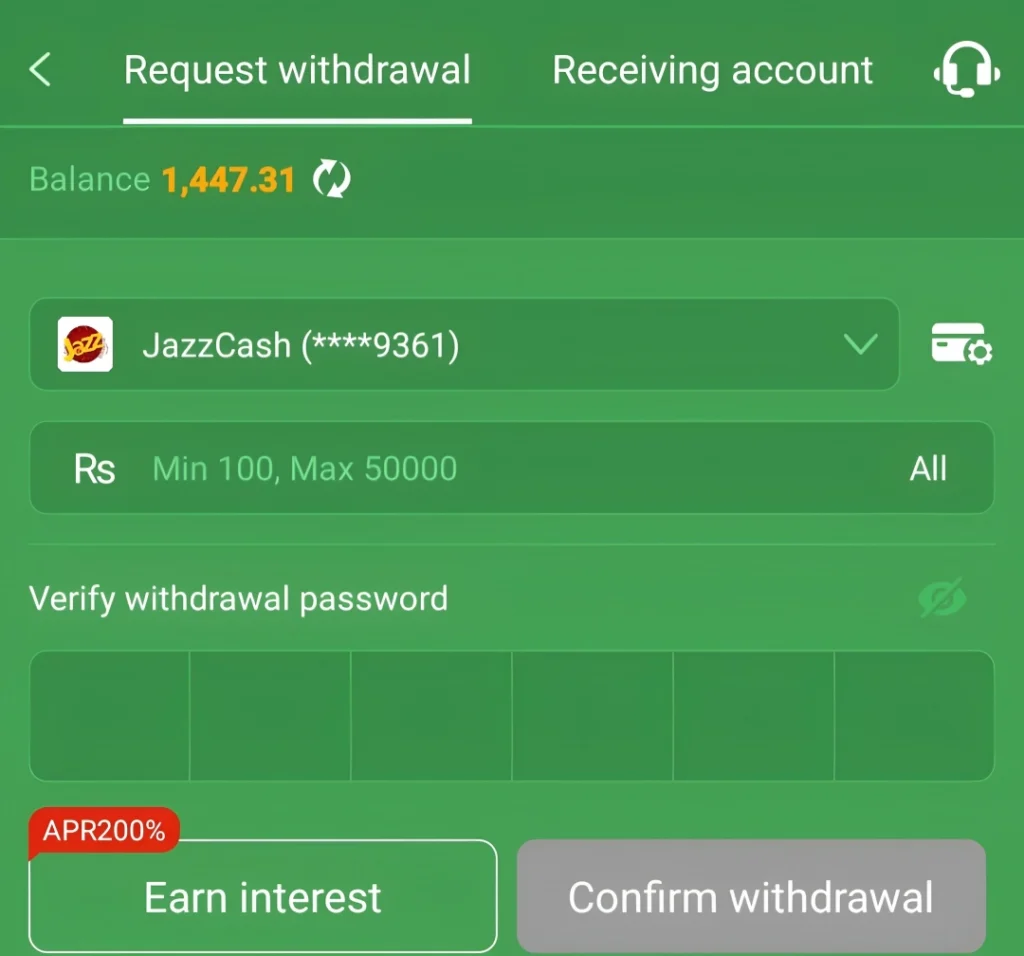
Before you can make your first withdrawal, you need to set up a receiving account. This is the JazzCash or EasyPaisa account where 777CX will send your money. It works as a dropdown menu where you can select a saved wallet or add a new one. There is one thing about this step that you need to take very seriously.
Once you save your wallet details, they are stored permanently. You cannot change or update them later. So before you save your wallet number, check it once, then check it again. A wrong number here means your withdrawal could go to the wrong account and there is no way to fix it after the fact. Remember to take an extra minute on this step. It is worth it.
Setting Up Your Withdrawal Password
The first time you visit the withdrawal section, 777CX Game will ask you to set up a withdrawal password before anything else. This is a one time setup. After you create the password, you will need to enter it every time you make a withdrawal request. It is a simple security step to make sure no one else can take money out of your account.
Withdrawal Limits
| Amount | |
|---|---|
| Minimum Withdrawal | Rs. 100 |
| Maximum Withdrawal | Rs. 50,000 |
Withdrawal Fees
Withdrawals on 777CX are free for most players. Here is how the fee structure works:
| Withdrawal Amount | Fee |
|---|---|
| Up to Rs. 10,000 | Free |
| Above Rs. 10,000 | Rs. 10 deducted for every Rs. 10,000 |
So for example if you withdraw Rs. 30,000 a total of Rs. 30 will be deducted. It is a very small fee and most players who withdraw smaller amounts will never pay anything at all.
How to Request a Withdrawal — Step by Step
1. Open the Withdrawal Section Tap the withdrawal option on the right side of the bottom bar.
2. Check Your Available Balance At the top of the screen you will see your balance displayed in bright yellow. This is how much you currently have available to withdraw.
3. Select Your Receiving Wallet Below the balance you will see your linked JazzCash or EasyPaisa account. Make sure it is the right one.
4. Enter the Amount You Want to Withdraw Type in your withdrawal amount. Keep it between Rs. 100 and Rs. 50,000.
5. Enter Your Withdrawal Password Type in the withdrawal password you set up earlier to verify the request.
6. Tap Confirm Withdrawal Hit the Confirm Withdrawal button to proceed.
The Betting Task — What It Is and What to Expect
After you tap confirm, one of two things will happen depending on your activity on the platform.
If you have already completed the required bets, the system will skip the betting task screen automatically and your withdrawal will go through straight away.
If you have not completed enough bets yet, you will see a Betting Task reminder. This screen shows you exactly how many more valid bets you need before your withdrawal becomes available.
A few things worth knowing about the betting task:
- The platform calculates the number of bets required based on how much you deposit.
- Any bet you place on the games counts as a valid bet. There is no minimum bet size to worry about. Just play normally and your bets will keep counting.
- Once you reach the required number, go back to the withdrawal section and submit your request again. It will go through this time.
This system is standard on most real money gaming platforms. It is simply a fair play requirement before funds are released.
How Long Does a Withdrawal Take?
Once your withdrawal is confirmed and your betting task is complete, the money usually arrives in your JazzCash or EasyPaisa account within a few minutes.
Tracking Your Withdrawals
If you want to check whether a withdrawal has been processed or is still pending, head to the Withdrawal Records section inside the withdrawal tab. It shows your full withdrawal history and the status of each request so you always know where your money is.
What to Do If a Withdrawal Has Not Arrived
Most withdrawals arrive quickly but sometimes there can be delays. Here is what to check:
- High traffic on the platform can sometimes cause withdrawals to take a little longer than usual. Give it some time before worrying.
- If the money has not arrived at all, first double check that your receiving wallet details are correct in the Receiving Account section.
- If everything looks right but the money still has not come, contact 777CX support and share your withdrawal details. The support team will investigate and help you sort it out.
Frequently Asked Questions
Yes, 777CX supports both payment methods and you can use either one for deposits and withdrawals.
No, there are no fees on deposits. You also get a 0.5% bonus on every deposit you make.
No. Once your wallet details are saved in the Receiving Account section they cannot be changed. Make sure the number is correct before saving it.
Wait up to 24 hours as the refund usually comes back automatically. If it does not, contact 777CX support with your transaction ID.
The number depends on your deposit amount. The withdrawal section will show you exactly how many valid bets you still need to complete.
Not instant but very fast. Most withdrawals are delivered to your wallet within a few minutes of being confirmed.
First check your receiving wallet details. If everything is correct and the money has still not arrived, reach out to 777CX support for help.
Final Thoughts
Deposits and withdrawals on 777CX Game are designed to be simple and fast. With JazzCash and EasyPaisa as payment options, most players in Pakistan can get started without any complications. Deposits reflect in seconds, withdrawals arrive in minutes, and the automatic bonus and promotion system adds extra value every time you add money to your account.
The most important things to remember are to double check your receiving wallet details before saving them and to keep your transaction IDs handy whenever you make a payment. Other than that the whole process is smooth and straightforward from start to finish.